Works with Puppeteer · Playwright · Selenium

Banned by anti-bot?
Swap the fingerprint,
not the script.

Your automation code is fine — your browser's fingerprint gives it away. Add three lines and launch with a fresh, real-device identity drawn from a pool of 50,000+ fingerprints.

How it works

Three extra lines. Zero changes to your logic.

The plugin wraps your existing automation driver. It fetches a real-device fingerprint, hands it to a patched Chromium, and launches — your script keeps running as it always did.

  1. 01

    Install the plugin

    One npm install next to Puppeteer, Playwright or Selenium. Same package manager, same project.

  2. 02

    Fetch a fingerprint

    Request one from the service with filters like OS, browser version or freshness, and apply it before launch.

  3. 03

    Launch as usual

    Call plugin.launch() instead of the vanilla launcher. Everything else — selectors, waits, clicks — stays identical.

Browser fingerprinting, explained

A proxy hides your IP. It doesn't hide you.

Every browser leaks a unique pattern of signals: the exact pixels your GPU draws, the fonts you have installed, the way your audio stack renders a sine wave, your screen resolution, your plugin list, your timezone. Together, these signals form a fingerprint — and it survives incognito mode, cookie clearing, and fresh proxies.

Anti-bot systems (Cloudflare, DataDome, PerimeterX, Akamai) compare that fingerprint against a known-bot baseline. Headless Chrome and default Puppeteer builds light up like a flare — same canvas hash, same WebGL vendor string, same missing fonts, every single run.

Rotating the fingerprint per session, with values drawn from real devices, is the difference between a script that runs for a week and one that's banned in an hour.

Code examples

Drop it into the script you already wrote.

Pick your automation library. Everything highlighted is the only code you add. Free tier works with an empty key — see the note under each example.

Install
npm i puppeteer-with-fingerprints puppeteer
Before — vanilla Puppeteer
const puppeteer = require('puppeteer');

(async () => {
  const browser = await puppeteer.launch();
  const page    = await browser.newPage();
  await page.goto('https://example.com');
  await browser.close();
})();
After — with fingerprints
const { plugin } = require('puppeteer-with-fingerprints');

(async () => {
  plugin.setServiceKey('YOUR_KEY');
  const fp = await plugin.fetch({ tags: ['Microsoft Windows', 'Chrome'] });
  plugin.useFingerprint(fp);
  const browser = await plugin.launch();
  const page    = await browser.newPage();
  await page.goto('https://example.com');
  await browser.close();
})();

Free tier: pass plugin.setServiceKey(''). Default tag ['Microsoft Windows', 'Chrome'] only, 1 request per 3 minutes, no PerfectCanvas.
Install
npm i playwright-with-fingerprints playwright
Before — vanilla Playwright
const { chromium } = require('playwright');

(async () => {
  const browser = await chromium.launch();
  const page    = await browser.newPage();
  await page.goto('https://example.com');
  await browser.close();
})();
After — with fingerprints
const { plugin } = require('playwright-with-fingerprints');

(async () => {
  plugin.setServiceKey('YOUR_KEY');
  const fp = await plugin.fetch({ tags: ['Microsoft Windows', 'Chrome'] });
  plugin.useFingerprint(fp);
  const browser = await plugin.launch();
  const page    = await browser.newPage();
  await page.goto('https://example.com');
  await browser.close();
})();

Free tier: pass plugin.setServiceKey(''). Default tag only, 1 request per 3 minutes, no PerfectCanvas or version filters.

Install
npm i selenium-with-fingerprints selenium-webdriver chromedriver
Before — vanilla Selenium
const { Builder } = require('selenium-webdriver');
require('chromedriver');

(async () => {
  const driver = await new Builder()
    .forBrowser('chrome').build();
  await driver.get('https://example.com');
  await driver.quit();
})();
After — with fingerprints
const { plugin } = require('selenium-with-fingerprints');
require('chromedriver');

(async () => {
  plugin.setServiceKey('YOUR_KEY');
  const fp = await plugin.fetch({ tags: ['Microsoft Windows', 'Chrome'] });
  plugin.useFingerprint(fp);
  const driver = await plugin.launch();
  await driver.get('https://example.com');
  await driver.quit();
})();

Free tier: pass plugin.setServiceKey(''). Default tag only, 1 request per 3 minutes, no PerfectCanvas or version filters.

Under the hood all three plugins share the same engine — browser-with-fingerprints. Windows only. Chromium is patched and managed for you.

The fingerprint pool

50,000+ fingerprints from real devices.

Every fingerprint in the pool was collected from an actual machine running an actual browser — not synthesised, not permuted, not stitched together. With tens of thousands of distinct real-device identities to draw from, the traffic your scripts generate blends in with the noise of ordinary users instead of standing out as automation.

  • WebGL
  • Canvas
  • Fonts
  • Plugins
  • Navigator
  • Audio
  • Screen
  • Timezone
  • Geolocation
  • Hardware

Paid plans unlock PerfectCanvas — pre-rendered canvas output that matches the donor device at a pixel level.

50,000+ real-device fingerprints pool refreshes continuously
Pricing

Start free. Switch to a key when the limits bite.

The free tier is great for poking around. Serious automation hits the request limit in about the time it takes to make coffee — that's what the key is for.

Most popular

Premium

$30/mo
or $60 / 3 months save $30

For production automation

  • 100 – 1000 requests / 3 minutes
  • All tags — Android, iOS, mobile, desktop
  • minBrowserVersion / maxBrowserVersion / timeLimit filters
  • PerfectCanvas pixel-matched rendering
  • Use the key across all four libraries
Get a key
Reliability

Undetectable where others get caught.

Most stealth libraries try to hide you by patching the browser from JavaScript. But that JavaScript runs in the same runtime as the anti-bot's detection code — and any hook is one toString probe away from being exposed. We took a different route.

Typical stealth libs

JavaScript injection

Overrides navigator.*, canvas.toDataURL, WebGLRenderingContext and friends by monkey-patching them at runtime. The patches live inside the page that's being inspected — that's the whole problem.

  • Detected via Function.prototype.toString probes
  • Canvas noise leaves statistical artefacts
  • Anti-bot vendors maintain detection lists for common patches
FingerprintSwitcher

Patched browser source

The fingerprint is swapped inside the Chromium source before the page ever loads. To every JavaScript probe the browser simply looks native — because from its own point of view, it is.

  • No runtime JS hooks — nothing to toString-probe
  • Binary-level replacement, fresh every session
  • Holds against Cloudflare, DataDome, Akamai, PerimeterX
Premium only
PerfectCanvas

The only way past canvas tracking.

Canvas fingerprinting is anti-bot's favourite trick: ask the browser to draw a hidden pattern, hash the pixels, and the result is unique to your exact GPU, driver, OS and browser build. Typical libraries try to hide by adding random noise to the pixels — and modern detectors spot that noise as a statistical anomaly.

PerfectCanvas doesn't add noise. It renders the target pattern on a real remote device matching the fingerprint, then hands back those real pixels byte for byte — compression, export settings and all. There's nothing synthetic to detect, because nothing is synthetic.

Read the PerfectCanvas technical wiki
  1. Step 01

    Intercept the request

    The plugin captures the exact canvas pattern the site is about to hash.

  2. Step 02

    Render on a real device

    A machine with matching GPU, driver and OS draws it — no emulation, no noise.

  3. Step 03

    Return byte-accurate pixels

    Identical to what that donor device would have sent. Nothing to analyse, nothing to flag.

Free to start No-code alternative

Not writing code? BAS builds the same automation visually.

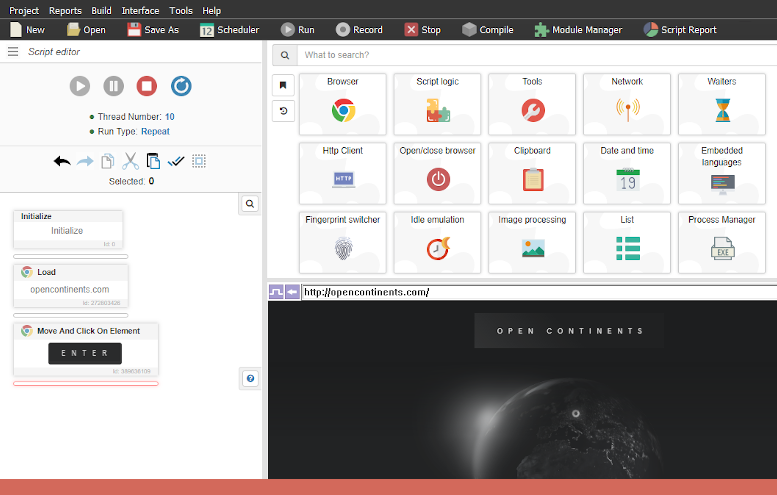
BrowserAutomationStudio is Bablosoft's flagship drag-and-drop automation tool. Record a workflow once, run it in parallel or on a schedule, and compile it to a standalone Windows .exe — without a line of JavaScript. The same FingerprintSwitcher engine you've seen on this page is baked in, and it's free to start using.

Visit the BrowserAutomationStudio page on bablosoft.com 

Your script doesn't need a rewrite. It needs a new face.

Three lines. One key. A pool of fifty thousand real identities.

Get a key